Keep data close to the plot
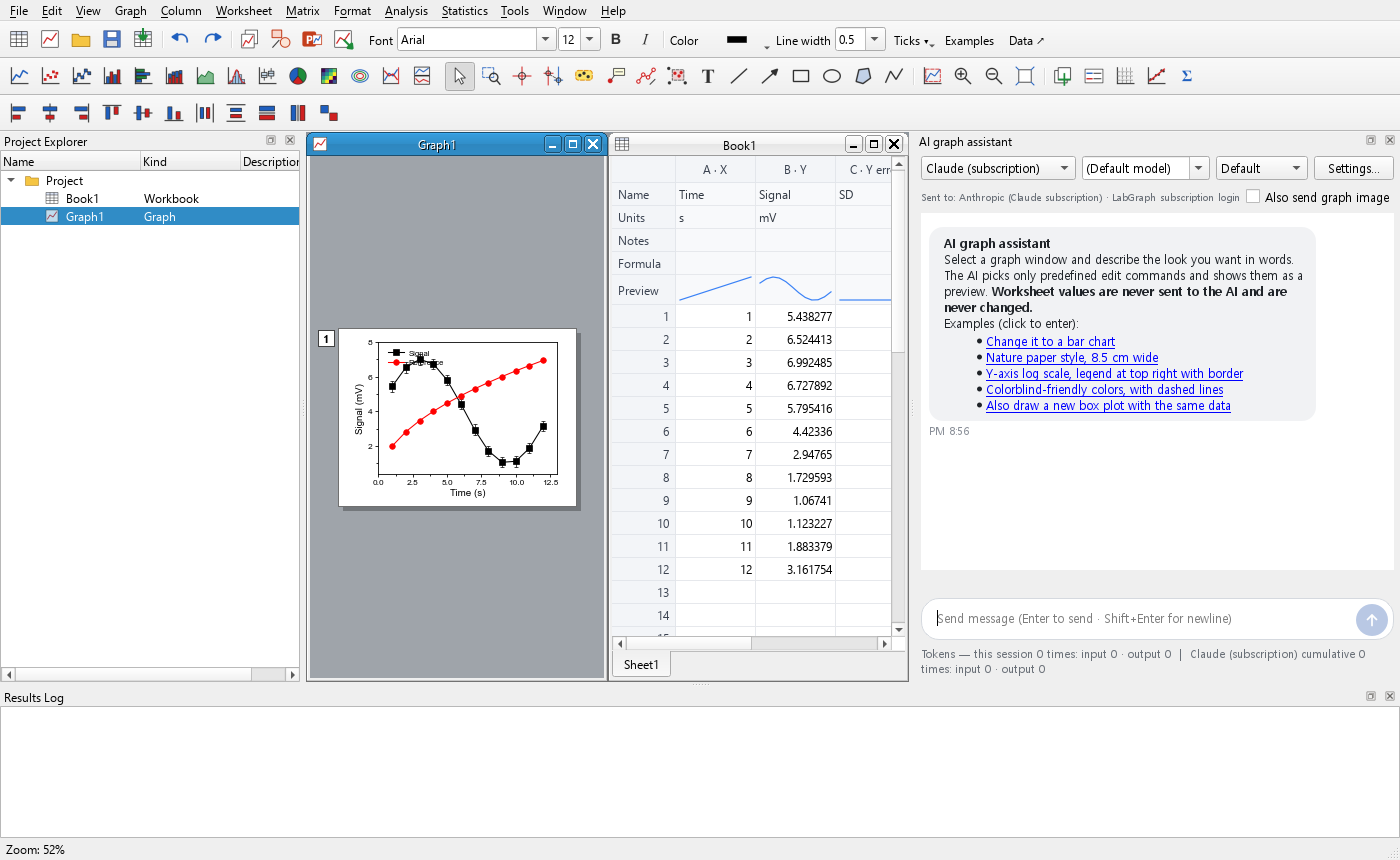
Import CSV/XLSX data or paste a worksheet. Designate X, Y and error columns, use formulas, and adjust a linked graph.
LAB GRAPH / WINDOWS DESKTOP
A desktop workspace for data, scientific plotting and analysis, with a practical path to editable presentations.
LAB GRAPH
Import CSV/XLSX data or paste a worksheet. Designate X, Y and error columns, use formulas, and adjust a linked graph.
Choose among 130 graph types, including XY, statistical, multi-panel, contour and 3D plots. Format labels, axes, legends and colors.
Copy PowerPoint shapes for direct editing, or use an embedded graph object to reopen the graph and its data in Lab Graph.
QUICK START
Close the application and save and close Office documents before installing. Run the Windows x64 installer.
Open a workbook, enter or import data, select your columns and choose a graph type.
Save your .lgs project. Export an image, a vector file or a PowerPoint presentation as appropriate.
Desktop Microsoft PowerPoint and Lab Graph are required to reopen embedded graph objects. Complex vector effects may be preserved as images.
LAB STUDIO / FIGURE + GRAPH
Choose a tool, make something clear, and keep it editable.