A real vector workspace
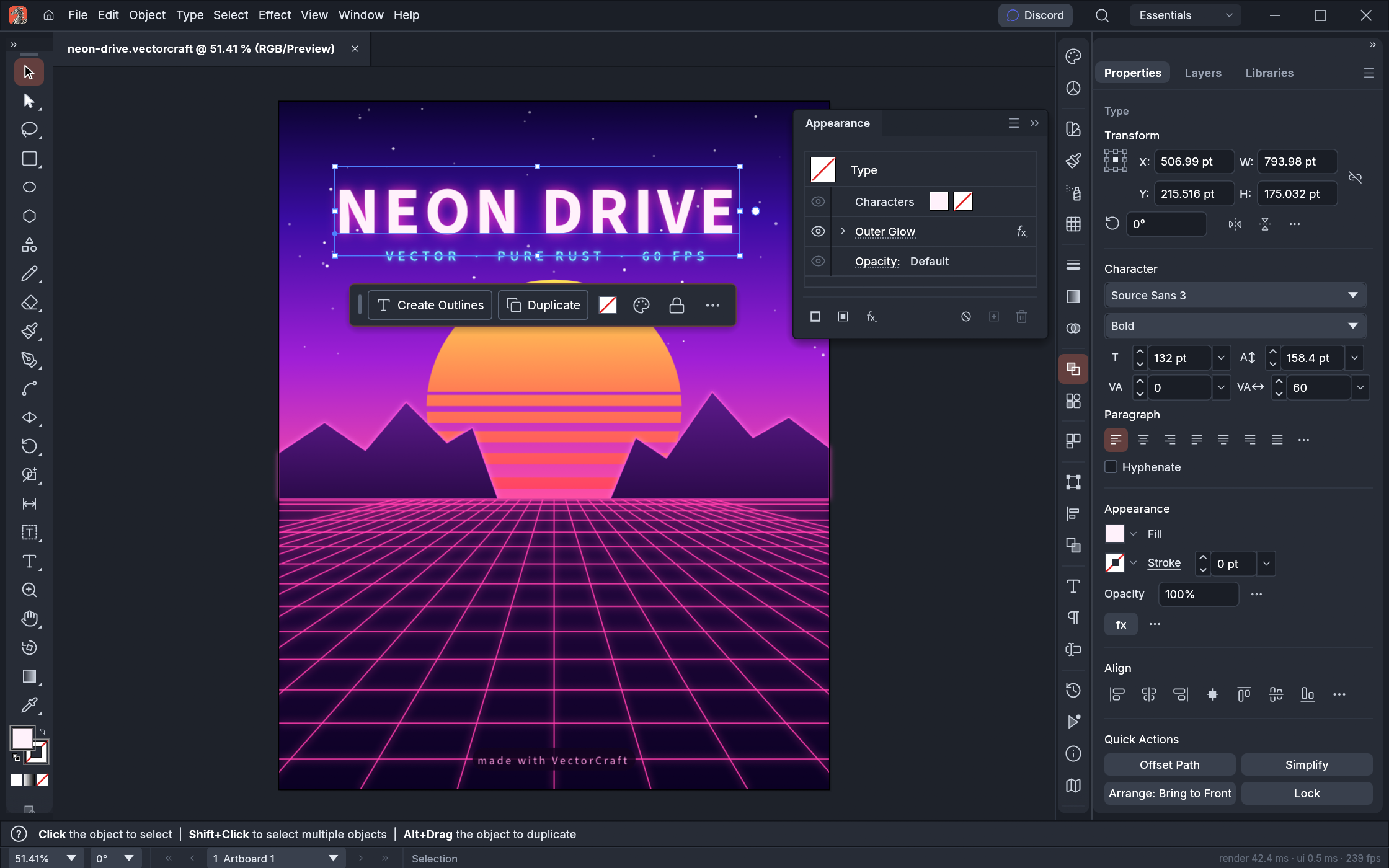
Work with paths, anchor points, fills, strokes, text, layers and artboards. The source document stays editable as your illustration develops.
LAB FIGURE / WINDOWS DESKTOP
A vector workspace for illustrations, diagrams and visual explanations, extended with a conversational AI assistant.
LAB FIGURE
Work with paths, anchor points, fills, strokes, text, layers and artboards. The source document stays editable as your illustration develops.
Describe a change, attach reference images and keep refining. Connect your own compatible provider in the application settings. AI output should be checked before publication.
Export artboards to PPTX. Supported solid shapes and horizontal text stay editable; complex fills, clipping and effects are preserved as images.
QUICK START
Extract the complete Windows x64 ZIP to a folder. Keep all included files together.
Run LabFigure.bat or LabFigure.exe. Start with the drawing tools or open an existing document.
Open the AI connection settings and connect your own provider. Login data is created locally on your computer.
Lab Figure is a local extension of the ArtCraft VectorCraft project, with an added AI assistant and PowerPoint export workflow. This is an independent distribution website, not the official ArtCraft website. Upstream credits and licenses are preserved.
LAB STUDIO / FIGURE + GRAPH
Choose a tool, make something clear, and keep it editable.